analytics API
The analytics API enables access to selected data from the OVOC database for the purpose of integration into Northbound third-party interfaces. Customers can connect to the OVOC database using third-party DB access clients and retrieve topology and statistics. This data can then be used in management interfaces such as Power BI, Splunk and other analytics tools to generate customized dashboards, reports and other representative management data. This may be particularly useful during management reporting periods. The following data can be retrieved:
| ■ | Network Topology including Tenants, Regions, Devices, Non-ACL Devices, Links |
| ■ | QoE Statistics including Calls, Nodes and Links Summaries |
| ■ | Active and History Alarms |
A dedicated DB operator 'analytics' is used for securing connection to the OVOC server over port 5432; this port must be opened on the customer firewall, once the relevant feature key is enabled (see Managing OVOC License Features) and in the procedure described below.
For more information, refer to OVOC Northbound Integration Guide.
| ➢ | To manage the analytics API: |
| 1. | From the Application Maintenance menu, choose Analytics API, and then press Enter. |
The 'License status' indicates whether the license feature is enabled and the 'Operational status' indicates whether this option is enabled.
analytics API
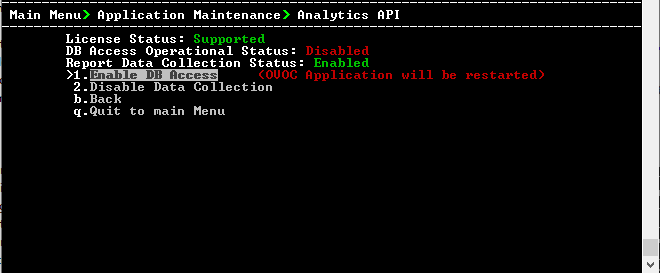
| 2. | Select option Enable DB Access to enable the Analytics API. |
| 3. | You are prompted to continue, type y to confirm, and then press Enter. The server is restarted. |
Once enabled, an option 'Change DB User Password' to change the default authentication password for the Analytics user connection appears in the menu. Enter the desired password and confirm.
The connector PostgreSQL driver must be used.